Loading...
Searching...
No Matches
Components
Everything an object does comes from its components. This page is how to write your own.
A small one
In the Asset Browser, open Scripts, right-click and choose Create C++ Script. Replace the two files with this:
src/Player.h:
#pragma once
#include <deki/Engine.h>
DEKI_CATEGORY("Game")
DEKI_DESCRIPTION("Moves the player.")
class Player : public Deki::Component
{
public:
DEKI_TOOLTIP("How fast it moves, in meters per second.")
DEKI_RANGE(0, 20)
float speed = 4.0f;
void Update() override;
};
Definition AssetLookupTable.h:17
src/Player.cpp:
#include "Player.h"
void Player::Update()
{
// The time since the last frame is in milliseconds.
Deki::Object* me = GetOwner();
me->SetWorldPosition(me->GetWorldX() + speed * seconds, me->GetWorldY());
}
A node in the scene: a name, components, children and, in most builds, a transform.
Definition Object.h:66
static float GetDeltaTimeF()
Duration of the last frame in milliseconds, with sub-millisecond precision.
Save, and the editor rebuilds your code. Add Component now lists Player.
Fields in the Inspector
DEKI_EXPORT shows a field in the Inspector and saves it in the scene. It works on numbers, bool, std::string, Deki::Color and references to objects and assets.
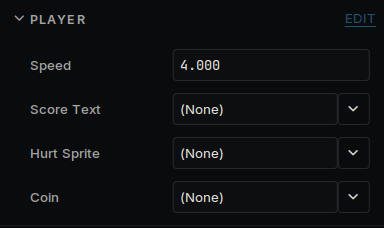
A component's fields in the Inspector
DEKI_TOOLTIP adds the text shown on hover, and DEKI_RANGE limits the value.
When your code runs
| Method | When |
|---|---|
| Awake | Once, when the object is ready. Set up the component itself here. |
| Start | Once, after every Awake. Talk to other components here. |
| Update | Every frame. |
Declare only the ones you need. A component with no Update costs nothing per frame.
Other components
On the same object:
#include "SpriteComponent.h"
auto* sprite = GetOwner()->GetComponent<Deki2D::SpriteComponent>();
To reach another object, add a field and pick the object in the Inspector:
#include <deki/reflection/ObjectRef.h>
#include "TextComponent.h"
Deki::ObjectRef<Deki2D::TextComponent> scoreText;
scoreText.Get()->SetText("Score: 10");
Get() returns nothing if the field is empty or the object has gone, so check it when either can happen. You can also find an object by name:
Deki::Scene* scene = GetOwner()->GetOwnerScene();
Object * FindDekiObject(const std::string &name)
The first object with this name, or this id, anywhere in the scene.
Making and removing objects
coin->SetWorldPosition(1.0f, 2.0f);
coin->AddComponent<Spin>();
Object * CreateDekiObject(const std::string &name="DekiObject")
To make many copies of something you built in the editor, save it as its own scene and point a field at it. Each call makes a copy and returns its root:
Deki::Object* copy = coinScene->Instantiate(scene, 3.0f, 1.0f);
Remove an object with scene->DestroyDekiObject(coin). It is safe from inside any component, including one on that object.
Changing scene
Deki::AssetRef<Deki::Scene> nextLevel;
Deki::Engine::GetInstance().OpenScene(nextLevel);
static Engine & GetInstance()
void OpenScene(const AssetRefBase &scene)
Opens the scene scene refers to (an AssetRef<Scene>) once this frame's updates are done: the scene be...
The old scene is freed before the next one loads, so the two are never in memory together.
Printing to the Console
DEKI_LOG_INFO("Score: %d", score);
DEKI_LOG_WARNING and DEKI_LOG_ERROR work the same way. They need #include <deki/LogSystem.h>. On a device the text goes to the serial port.