载入中...
搜索中...
未找到
Coming from LVGL
本指南尚未翻译。
LVGL is a C library you call to build a screen. Deki is an editor and an engine: you lay the screen out in a scene, see it as it will look on the device, and write code only for what it does. Most of what you know carries over.
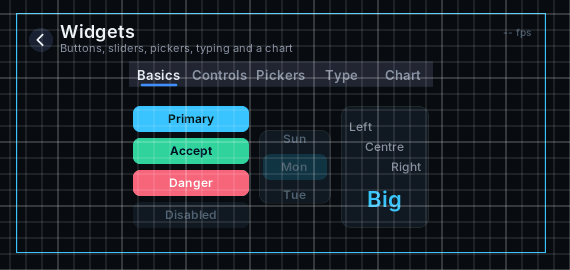
Some of the widgets in the Scene View
The same ideas, other names
| In LVGL | In Deki |
|---|---|
| A screen, lv_screen_load | A scene, opened with Deki::Engine::GetInstance().OpenScene |
| lv_obj_t and its children | An object and its children, in the Hierarchy |
| Position and size in pixels | Position and size in meters; pixels per meter is a project setting |
| Styles (lv_style_t) | The widget's parts: change their colour, font and corners directly |
| lv_obj_add_event_cb | The widget's callbacks, such as AddOnClickCallback |
| LV_EVENT_VALUE_CHANGED | AddOnValueChangedCallback, AddOnToggledCallback, ... |
| Groups (lv_group_t) for keypad and encoder | The focus system: every widget joins it, Tab and the arrows move between them |
| lv_timer_create | A component's RuntimeUpdate, called every frame |
| Fonts converted with lv_font_conv | Drop a TTF in the project; the editor bakes the sizes your texts use |
| Images converted to C arrays | Drop a PNG in the project; it is converted for each device's colour format |
| The display and input drivers you write | A platform: pick your device, its display and input come with it |
Widgets
| In LVGL | In Deki |
|---|---|
| lv_button | Button |
| lv_label | Text |
| lv_image | Sprite |
| lv_bar | Bar |
| lv_slider | Slider |
| lv_switch | Switch |
| lv_checkbox | Checkbox |
| lv_led | LED |
| lv_arc | Arc |
| lv_spinner | Spinner |
| lv_spinbox | Spinbox |
| lv_dropdown | Dropdown |
| lv_roller | Roller |
| lv_list | List (rows that start with "# " are its section texts) |
| lv_tabview | Tab View |
| lv_msgbox | Message Box |
| lv_calendar | Date Picker (rollers, not a month grid) |
| lv_textarea | Text Area |
| lv_keyboard | Keyboard |
| lv_chart | Chart (line or bar) |
Not here yet: table, menu, window, canvas, line, span and button matrix. Shapes and sprites cover most of what canvas and line are used for.
See UI widgets for how each one is added, styled and wired up.
What changes in practice
You see the screen while you build it. The editor draws the scene the way the device will, at the device's resolution and colour format, and the Play view runs it with your mouse as the touchscreen.
You write less code. Layout, looks and assets live in the scene and the project. Code is for behaviour: what a click does, what a value drives.
One project runs on several devices. A scene is in meters, and each device's camera shows it at that device's resolution, so a T-Deck and a T-Display share the same scenes.
You are not limited to UI. The same scene can hold sprites, tilemaps, particles and animations, and the widgets sit on top of a game as easily as on a settings screen.
Using both
On Tactility, which runs LVGL, a Deki game can run as a Tactility app. The deki-tactility-integration package builds it, and LVGL keeps running the rest of the device around it.