로딩중...
검색중...
일치하는것 없음
Text
이 가이드는 아직 번역되지 않았습니다.
How to show text and use your own fonts.
Show text
Add a Text Component to an object and type in Text.
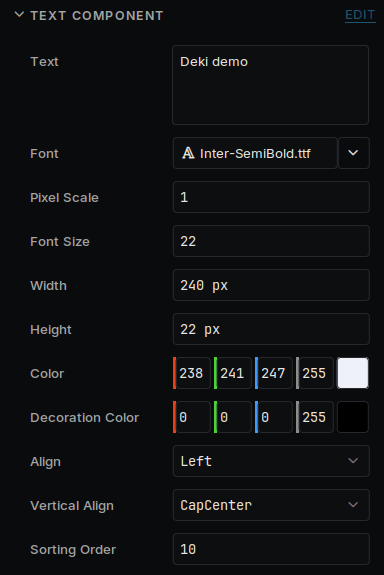
A text in the Inspector
| Field | What it does |
|---|---|
| Font | The font file to use |
| Font Size | The size, in pixels |
| Width, Height | The box the text sits in. Lines wrap between words to fit the width |
| Align, Vertical Align | Where the text sits inside the box |
| Pixel Scale | Draws each pixel of the font as a larger block, which keeps a pixel font sharp |
Use your own font
Drag a .ttf or .bdf file onto the Asset Browser, then choose it in Font. The editor prepares each size the first time a text uses it.
Select the font in the Asset Browser to see its settings.
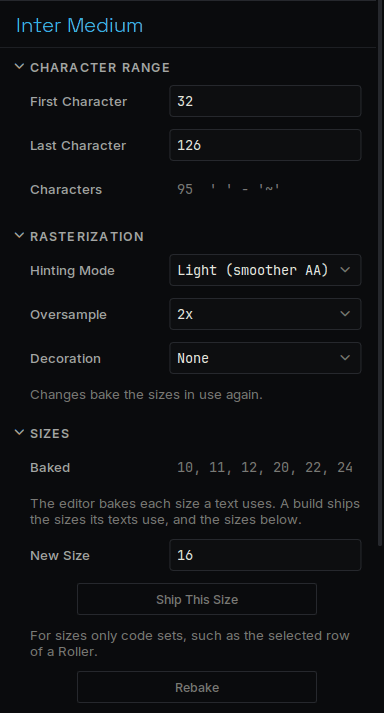
A font's settings
| Setting | What it does |
|---|---|
| First Character, Last Character | Which characters are included. The default is plain English. Accented letters and other alphabets need a wider range |
| Decoration | Adds an outline or a shadow. Its colour is the text's Decoration Color |
| Ship This Size | Includes a size that only your code sets |
Each size takes memory on a device, so a few sizes go a long way.
From code
#include "TextComponent.h"
auto* text = GetOwner()->GetComponent<Deki2D::TextComponent>();
text->SetText("Game over");
text->SetColor(255, 200, 0);
To translate your game, see Languages.