Loading...
Searching...
No Matches
LilyGO T-Deck
The first T-Deck: a pocket computer with a keyboard, a trackball, a touch screen and a LoRa radio.
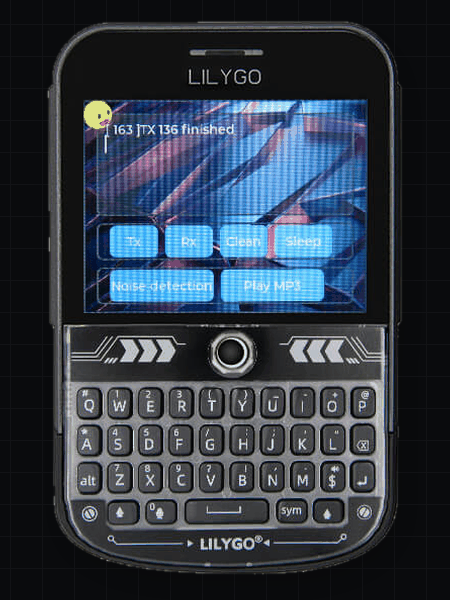
LilyGO T-Deck
Specifications
| Part | Detail |
|---|---|
| Processor | ESP32-S3 |
| CPU speed | 240 MHz |
| Flash | 16 MB |
| RAM | 8 MB |
| Screen | 320 x 240, 2.8 in |
| Colour format | RGB565 |
| Also has | Wi-Fi, Bluetooth, SD card |
Use this device
- In the Package Manager, install deki-lilygo-boards.
- In the Build Panel, choose LilyGO T-Deck.
- Press Build & Flash.
What is set up for you
Display, backlight, touch, keyboard, trackball, SD card and LoRa. Keys arrive like a desktop keyboard's.
Not set up yet: speaker, microphone and battery reading.
Good to know
- The trackball moves a pointer and clicks. Set its Mode to Keys in your copy of the boot scene for arrow keys and Enter.
- Your game's assets are in the flash, so it runs with no SD card. A game too big for the flash can keep them on the card with Storage > Assets: External storage, and then needs one.
- LoRa is set for Europe: 868.1 MHz, 14 dBm, 1% duty cycle. Change Frequency in your copy for another region, such as 915 MHz in the Americas.
- GPIO 43 and 44 are the Grove port, left free for you.
- If dark colours look pink and white looks green, turn on Swap Bytes in the display's settings.
- If the device does not show up as a port, hold BOOT (the trackball click), press RESET and release BOOT.
Pins
| Part | Pins |
|---|---|
| Power switch for display, touch and keyboard | GPIO 10 |
| SPI bus | SCK 40, MOSI 41, MISO 38 |
| Display (ST7789) | DC 11, CS 12, backlight 42 |
| I2C bus | SDA 18, SCL 8 |
| Touch (GT911) | Address 0x5D, interrupt 16 |
| Keyboard | Address 0x55 |
| Trackball | Up 3, down 15, left 1, right 2, click 0 |
| SD card | CS 39 |
| Grove port | GPIO 43, 44 |
| LoRa (SX1262) | CS 9, BUSY 13, RESET 17, DIO1 45 |