Loading...
Searching...
No Matches
Animation
There are two kinds: frames that play one after another, and values that change smoothly over time.
Frame animation
First cut your image into frames: see Sprites. Then:
- In the Asset Browser, right-click a folder and choose Create... → Animation.
- Double-click the new file. The Animation Editor opens.
- Pick your image under Spritesheet.
- Click frames to add them to the timeline, and set New Frame (ms) for how long each one is held.
- Press Add Animation for each other animation, such as idle and walk, and give each a Name.
- Press Save.
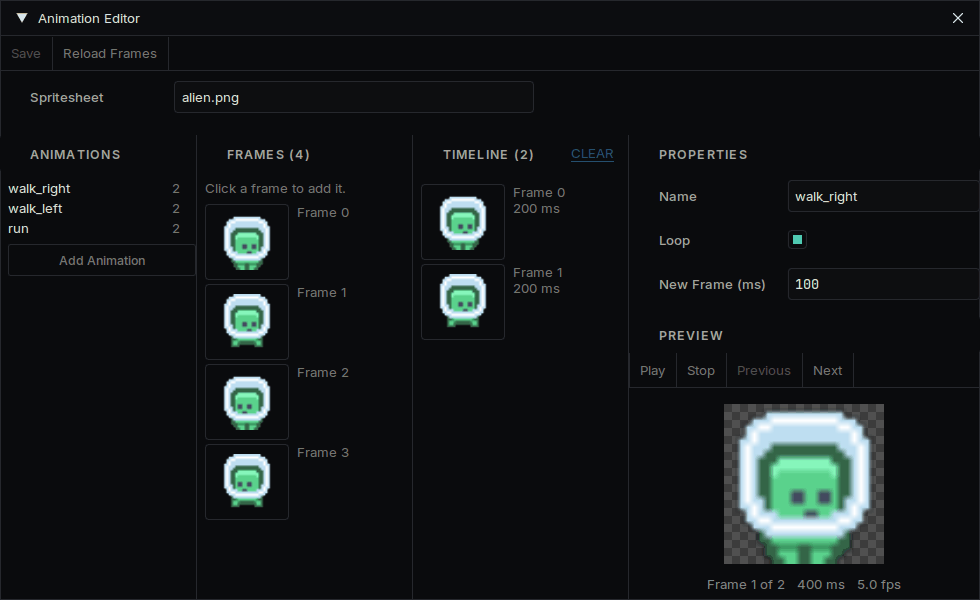
The Animation Editor
On your object, add a Sprite Component and an Animation Component, and choose the file in Animation. It plays the first animation when the game runs.
Choosing what plays
Use the names you gave them:
#include "AnimationComponent.h"
auto* animation = GetOwner()->GetComponent<Deki2D::AnimationComponent>();
animation->PlayAnimation("walk");
| Call | What it does |
|---|---|
| PlayAnimation("walk") | Plays it, and leaves it alone if it is already playing |
| PlayAnimationOnce("hit") | Plays it once, even if it loops |
| Pause(), Resume() | Freezes it on the current frame, and continues |
| Stop() | Stops and shows the first frame |
To do something when an animation that does not loop ends:
animation->SetCompletionCallback([animation]() { animation->PlayAnimation("idle"); });
Calling PlayAnimation every frame is fine: it does not restart what is already playing.
Smooth movement
The deki-tween package moves an object without code. Install it from the Package Manager, then add a Tween Component to the object.
| Field | What it does |
|---|---|
| Target Type | What changes: position, scale or rotation |
| End Value | Where it arrives |
| Duration | How long one pass takes, in seconds |
| Ease Type | The shape of the motion. Ease-in-out looks natural for most things |
| Loops | 0 runs once, -1 repeats forever |
| Ping Pong | Goes back again on alternate passes |